Back to projects

Family Clinic Website & Admin Panel

Klinik Cahaya MedikaCase Study.

A one-page website for a family clinic, with a lightweight admin panel so the owner can update doctor schedules and service info themselves — without waiting on a developer for routine changes.

Public Landing PageClinic Admin PanelRow Level SecurityOn-Demand ISR
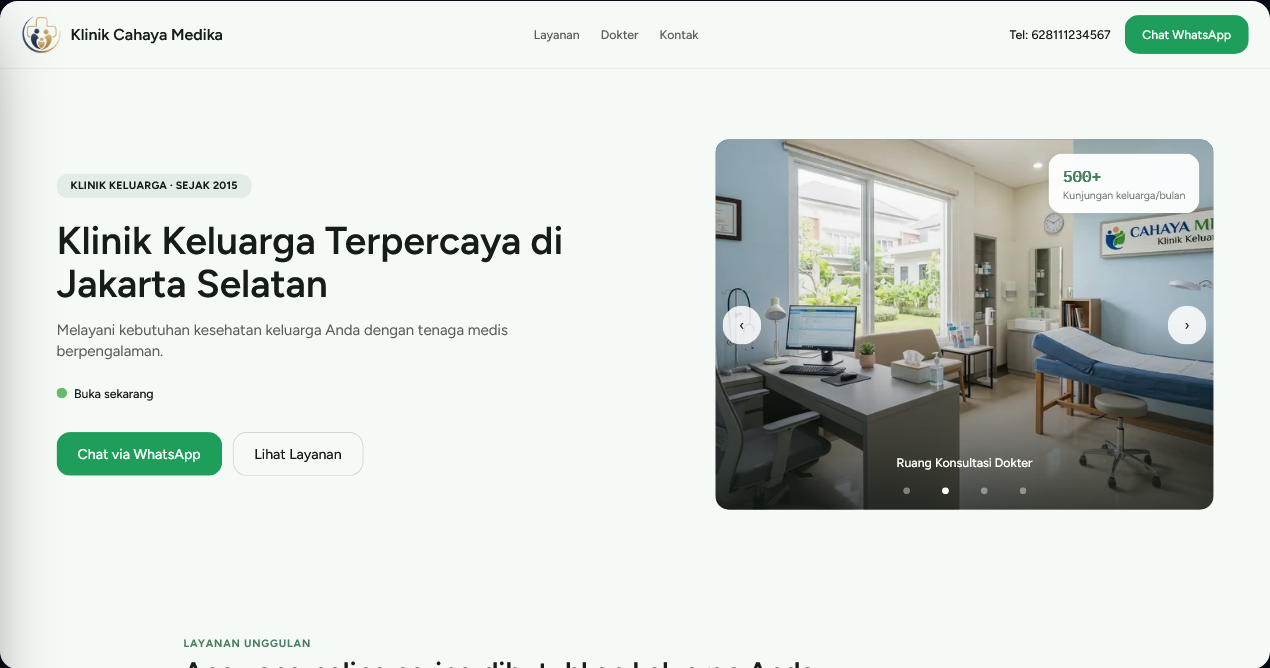
Klinik Cahaya Medika homepage hero
1 Admin Role
!

Transparent portfolio note

Klinik Cahaya Medika is an illustrative case study / internal template used to demonstrate an end-to-end process — from planning documents to technical implementation. It is not presented as a client project.

Project Overview

One public website, one control panel the owner fully owns.

Klinik Cahaya Medika explores how a small family clinic can have a website that stays accurate, without making the owner depend on a developer for routine updates.

9 Screens

5 Admin Endpoints

1 Admin Role

Case study focus

  • Designing a self-service panel so the clinic doesn't depend on a developer for routine changes.
  • Keeping one source of truth through a document chain — PRD, Tech Spec, Blueprint, through to code.
  • Making Row Level Security the primary authorization layer, not just an application-level check.

01 / Problem

Small family clinics often manage important info manually.

Doctor schedules, service info, and open/closed status often live apart from the website — in the owner's head, in a WhatsApp group, or in notes that never get updated.

01

Doctor schedules go stale fast

Every schedule change needs a developer and a wait, while patients show up on outdated info.

02

Service info is inconsistent

Services or prices that change on the ground aren't automatically reflected on the website.

03

Patients call to check manually

Without a clear open/closed status, staff field calls just to confirm today's hours.

04

No trace of what changed

When data is wrong, it's unclear who changed what and when — hard to trace, harder to fix quickly.

02 / Solution

One system, two clearly scoped sides.

Public visitors get information that stays accurate; the clinic owner gets full control to keep it that way — without needing to understand code.

Public Side · Patients

Pages that answer questions fastest

  • Clinic summary, services, and doctor profiles on one page.
  • An “Open Now” status indicator calculated automatically from the schedule.
  • WhatsApp as the primary contact channel, matching how patients already communicate in Indonesia.
Admin Side · Clinic Owner

Full control without needing a developer

  • Secure login, then edit each doctor's weekly practice schedule from a table.
  • Manage the service list and doctor profiles/photos, with a live public preview right on the edit screen.
  • Every change is logged automatically — who changed what, and when.

03 / Screens

Not a mockup — these are screenshots of the running app.

The public pages are designed to be understood fast by prospective patients; the admin panel is designed to be operated fast by a clinic owner who isn't an IT person.

Public Side

Homepage & contact
Homepage Hero

Homepage Hero

Clinic identity, real-time open/closed status, and a WhatsApp CTA visible without scrolling.

Credibility & Services

Credibility & Services

Trust numbers (since 2015, 500+ patients) and a summary of featured services.

Doctors & Practice Hours

Doctors & Practice Hours

Doctor cards with weekly practice hours — sourced from the exact same data the admin edits.

Contact & Location

Contact & Location

Today's operating hours, address, and an embedded map.

Admin Side

Login & control panel
Admin Login

Admin Login

A focused login screen — the only door into the control panel.

Admin Dashboard

Admin Dashboard

Open/closed status, 4 core modules, and a “Recent Activity” log on one screen.

Edit Doctor Schedule

Edit Doctor Schedule

A Monday–Sunday table with a live public-preview panel on the right.

Edit Services

Edit Services

Name, description, and a per-service toggle to show it on the homepage.

Edit Doctor Profile

Edit Doctor Profile

Photo upload, name, and specialty — no developer involved.

Change History

Change History

A full audit log: who changed what, and when.

A detail no mockup would show

Every edit screen (schedule, services, doctor profile) has a “Public Preview” panel on the right — the admin sees exactly how the change will look on the homepage before pressing save.

Responsive by design

Layout, the schedule table, and admin navigation cards are tested at three core breakpoints, mobile-first.

360px768px1280px

04 / Features

Features mapped to real clinic needs.

Every feature answers one specific operational problem, not just a visual add-on.

Open/Closed Indicator

Status is calculated automatically from doctor schedules — shown in the hero and footer, never stale.

WhatsApp CTA

The primary channel to reach patients, matching a communication habit already familiar in Indonesia.

Real-Time Preview

Every edit screen shows the actual public view before the admin presses save.

Self-Service Admin Panel

Edit schedules, services, and doctor profiles straight from the browser — no code involved.

Doctor Photo Upload

Profile photos are stored safely in object storage with a size limit, no manual developer step.

Change History

Every data change is logged automatically as an audit trail — who, what, and when.

05 / Design Approach

A token-based design system, not improvised colors.

Every color, radius, and typeface traces back to one source document — consistent across every screen, and easy to justify.

Nakhoda

#151D18

Cahaya

#497F5D

CTA WhatsApp

#1E9E5A

Latar

#F5FAF6

Jaga (Open)

#67BB6B

Senja (Closed)

#9C7A5B

Signature element

Buka Sekarang

The “Indikator Cahaya” — a light dot with a soft, breathing halo for open/closed status, designed specifically for this clinic's identity rather than a generic traffic-light badge.

Contrast

Minimum WCAG AA 4.5:1, with extra care above the Cahaya color.

Touch target

Minimum 44×44px for every interactive element.

Radius

A consistent 16px across cards, buttons, and inputs — deliberately not a fully organic shape.

06 / Development Approach

From API contract to a full-stack system.

Every layer follows the same contract, with Row Level Security as the primary authorization layer — not just an application-level check.

Layer 01

Frontend UI

Public pages, admin forms, the schedule table, and real-time preview.

Next.js 15 / App Router / Tailwind

Layer 02

Backend API

Thin Route Handlers: validation, admin guard, then call the service.

Route Handlers / Zod / requireAdmin()

Layer 03

Database

Row Level Security as the primary authorization layer, atomic writes via RPC.

Supabase Postgres / RLS / RPC

Layer 04

Deployment

An explicit region for Indonesian users, on-demand revalidation.

Vercel (sin1) / Supabase SG

07 / What This Shows

A portfolio project that shows more than visuals.

01

Product & Process Thinking

A connected chain of planning documents, not decisions made quietly on the side.

02

Architecture & Security

RLS as the primary authorization layer, atomic writes through real database transactions.

03

Token-Based Design System

Color, typography, and radius locked to one traceable source of truth.

04

Clean Version Control

Trunk-based, Conventional Commits, and commit traceability back to source documents.

Build Something Similar

Need a website you can control yourself, without waiting on a developer?

Noble Dev can help plan a website and lightweight admin panel for a clinic, tutoring center, or service business whose schedule is still managed manually.

Discuss a similar project
Klinik Cahaya Medika Case Study | Noble Dev